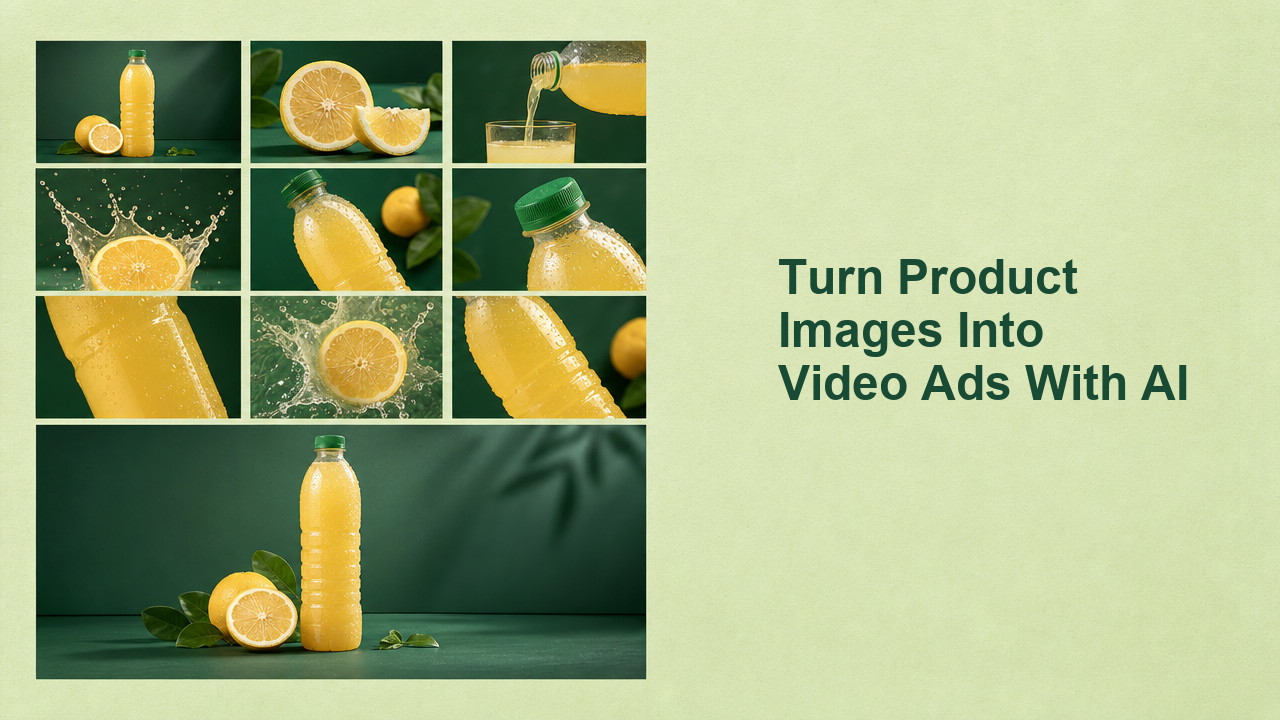
Most ecommerce teams have more product photos than usable video ads. The problem is not the photo itself; it is the missing system around it. A clean product image can become a short-form ad, but only if the team controls motion, format, hook, review, and publishing instead of asking an AI tool for a magic finished clip.
This guide shows how to turn product images into video ads with AI without losing the details that make the product believable. It expands Videotok's public walkthrough on creating a polished animated product ad from one image, then turns that demo into a repeatable workflow for performance marketers, social media managers, ecommerce teams, and creative strategists. You will see what to prepare before generation, how to choose motion and references, where hooks and scripts enter the process, and how to publish variants as a learning loop rather than a one-off render.
Watch the product-image workflow
The source video for this article shows the practical version: choose a product video template, upload one product image, set quality and aspect ratio, generate the animation, preview the result, and publish it directly to social media. It also shows how connected social accounts and an AI agent can turn the same workflow into recurring product content.
The useful lesson is simple: one photo is an input, not a strategy. The product image gives the model something concrete to preserve. The workflow around it decides whether the output becomes an ad your team can test.
If you need the broader production system around hooks, scripts, scenes, edits, and performance loops, keep the related AI product video workflow for social ads nearby. This article is narrower: the path from one static product image to a video ad set.
AI image-to-video works best when the still already contains a clear subject, readable edges, lighting cues, and enough depth for the model to animate. A flat packshot can still work, but it needs a different motion plan from a lifestyle image with foreground and background separation.
For ecommerce teams, the source image is also the quality contract. If the image has the wrong label, a distorted object, or a confusing crop, the video will amplify the problem.
Choose a truth source
Pick one approved product image as the truth source. It should show the exact product, color, packaging, shape, and scale you are allowed to advertise.
Before generating, write down what cannot change: product color, label position, material, flavor, size relationship, texture, claims, and any legal or retail detail. That short list becomes the review checklist after every generation.
This matters because accuracy is part of performance. A more dynamic ad is not useful if it changes the product customers receive.
Decide the ad job before the motion
Do not start by asking for movement. Start by choosing the job of the ad.
Common jobs include a launch reveal, offer reminder, problem-solution demo, seasonal angle, social proof frame, bundle push, or retargeting creative. Each job needs a different motion plan. A launch reveal may use a slow push-in. A feature demo may need a hand movement or close-up sequence. A retargeting offer may need a clear product hold and stronger text overlay inside the final edit.
The fastest way to avoid generic output is to name the ad job before you choose the template.
Build a reference stack without copying
Use public ad libraries and creative centers to understand patterns, not to copy another brand's assets. TikTok's Creative Center top ads is useful for spotting platform-native pacing, openings, and product framing. Meta's video ads guide and Google's video ad format guidance are useful reminders that format and placement change the creative job.
Inside Videotok, teams can use product ad workflows, product images, templates, quality settings, and references to keep the AI brief grounded. The reference should answer one question: what kind of product moment are we trying to create?
Turn one image into a controlled video ad
Once the input is clean, the generation step should be narrow. You are not asking AI to invent a campaign. You are asking it to animate one product image into a useful ad asset that can move into editing, review, and publishing.
Select the format first
Choose the channel and aspect ratio before generation. A vertical TikTok or Reel needs different framing from a YouTube ad or a product page clip. If the product sits too low in the frame, captions and UI controls can cover it. If it is too small, the ad may look polished on desktop and invisible on mobile.
Videotok's image-to-video workflow is useful here because the product image, format, generation, editor, and social output can stay in one flow instead of moving through separate tools.
Write motion as a constraint
A good motion prompt is not long. It is specific.
Weak prompt: make this product cinematic.
Better prompt: slow camera push toward the bottle, soft light movement across the label, citrus slice stays beside the product, no product distortion, no new text.
The second version gives the model boundaries. It names the camera move, the product detail, and the failure mode to avoid. That is the level of control most product images need.
Generate variants with one variable changed
Do not create ten random outputs. Create controlled variants.
Change one variable at a time: motion speed, opening frame, background depth, product angle, prop behavior, or hook overlay. This makes the results easier to review and easier to learn from.
The rule is volume with memory. AI is valuable because it can create more options quickly. The team still needs a naming system, review notes, and a reason each variant exists.
Build the hook and edit around the output
The generated clip is the raw creative asset. The ad begins when the hook, script, caption, edit, and CTA match the audience.
Start with the first three seconds
Short-form product ads often win or lose before the full product story begins. The first three seconds should make the viewer understand why the product is worth another look.
Use an AI hook generator when you need options, but keep the creative rule human: the hook must match the first frame. If the first frame is a product reveal, the hook can tease the result. If the first frame is a close-up texture, the hook can make the sensory detail matter.
Write the script after the visual direction
For one-image product ads, the script should support the visual rather than compete with it. A strong script does three things: names the product promise, adds proof or specificity, and gives the viewer a next action.
Videotok's script generator can help turn the product angle into social copy, but the best prompt includes the chosen ad job, the product truth list, the format, and the audience. A generic product description will create generic lines.
Use brand rules as constraints
AI product videos can drift into whatever visual language the model finds attractive. That is dangerous for brands with a recognizable feed, packaging system, or campaign look.
Before export, check the output against your brand colors, tone, caption style, and offer language. Videotok's brand workflow is designed for this kind of constraint: the creative can move faster while the brand rules stay visible.
Publish as a learning loop, not a one-off render
The biggest advantage is not that one product image becomes one video. It is that one product image can become a structured set of testable creative.
Review before publishing
Use a fast review pass before any variant leaves the team:
Product is accurate.
Motion looks intentional.
First frame earns attention.
Hook matches the visual.
Format fits the placement.
Claims are approved.
CTA is clear.
This is where many AI ads fail. They look finished, so teams skip the review logic. Treat the output like a first edit, not final proof.
Schedule variants with a purpose
If a clip passes review, decide what it is meant to teach. One variant can test the product angle. Another can test the hook. Another can test motion intensity. Another can test platform format.
The July 17 Videotok walkthrough shows direct publishing and connected social accounts, which matters because the workflow does not end at export. A product-video system should help teams create, approve, schedule, and publish while the creative decisions are still attached to the asset.
That is where an AI video agent workflow becomes useful. The agent is not just generating clips. It is carrying the product inputs, references, scripts, edits, schedule, and feedback loop forward.
Read performance without flattening taste
Performance data should sharpen the next round, not make every ad look the same. If a close-up opening wins, test three more close-up variations with different hooks. If a background scene fails, ask whether the product was unclear, the motion was distracting, or the offer was weak.
This is also where related creative systems help. Static variants can test hooks and offers before video production; see the AI static ads workflow for that side of the loop.
The checklist to copy
Use this workflow when you need to turn one product image into video ads with AI:
Choose one approved product image.
List the product details that cannot change.
Pick the ad job.
Choose the platform format and aspect ratio.
Select one template or reference direction.
Write a short motion prompt with constraints.
Generate controlled variants.
Add hook, script, caption, and CTA.
Review product accuracy and brand fit.
Publish variants with one learning goal each.
The creative standard is not "did AI make the photo move?" It is whether the final ad is believable, brand-safe, and useful enough to test.
For teams producing social content every week, Videotok turns this from a scattered tool chain into one creative operating system: product image, references, generation, editor, brand rules, social accounts, and publishing in the same workflow.
Final thought
The best product-image-to-video workflow is restrained. It does not ask AI to invent the product, the offer, and the campaign in one pass. It gives AI a strong image, a clear ad job, a few controlled motion choices, and a review loop.
That is how one product photo becomes more than a moving asset. It becomes the start of a video ad system your team can repeat.